The Tools

The Software, Hardware, and more

What I use to make my music

I make my music these days mostly “in the box” meaning that I do almost everything with software. For now the only live instrument is my voice. All other sounds are virtual instruments created using samples of real instruments, synthesizers, and other audio manipulations to create digital audio to be manipulated in the creation of music. At the core I use Apple’s Logic Pro DAW as my virtual studio running on an Apple Mac computer. I further use other software to manipulate sounds including my voice in the overall production. The melodies, chord progressions & lyrics are conceived by myself in an otherwise natural way; I’m just using a less than traditional set of tools.

The Sounds

I use a lot of different sources for the sounds I use, and I’m regularly adding to my inventory. For this I’m trying to focus on the sources I tend to use the most; my favorites. I’ll feature them here roughly ranked by how much I tend to use them, and how much I really like them. As you can see I’m featuring quite a few here, but this is not a comprehensive collection. I have used, and continue to use a few not featured here. As you may also see, I use several Kontakt instruments. In addition to those Kontakt instruments shown here I also use the libraries that come with Kontakt quite a bit. I also use some samples and presets from Vicious Antelope, and WA Productions. Most of my drum sounds are a collection of MIDI triggered samples from various sources that I spent many hours sorting to find the ones I like the best. I set up templates to program the MIDI for my favorite drum & percussion samples across my sessions which helps keep those sounds more consistent across my productions.

Synthesizers

& virtual

instruments

Audio Processing Plugins

Logic Pro comes with a lot of great software. One can create great sounding professional grade productions using what comes already loaded with the DAW. It’s really not necessary to get extra plugins from other developers. Of course, that’s hard to resist, and I’ve spent loads of money buying plugins by other developers. I only have a few regrets in that. It is great to have so many creative tools to work with! In this section I’ll highlight my favorite plugins that come bundled with the Logic Pro DAW. Some I’ve used often; and some I’m a bit ashamed I’ve tended to ignore. In compiling this I hate that I’ve slept on a few of these plugins I got for free with Logic. I’m making it a point to utilize the previously ignored gems going forward.

Apple Logic Pro

Audio mastering software interface displaying a frequency graph, control knobs for dynamics and spread, and options for EQ adjustment.
Screenshot of Quantec Room Simulator audio settings for a bathroom, displaying reverb time, room size, reverb density, delay, level, and equalizer levels with graphical meters.
Screenshot of an audio effect plugin interface called ChromaGlow. It shows settings for a Squeeze model, Soft Press style, with parameters for low and high cut, and a visual waveform with colorful oscillating lines.
Graph showing sound frequency spectrum and equalization settings. Top section displays a chromatic scatter plot of frequencies from 20Hz to 20kHz with a curved line indicating the equalization curve. Percentage labels and control sliders for attack, size, density, decay, distance, dryness, and wetness are shown below, with various tuning parameters for audio processing.
Screenshot of an audio editing software showing a waveform with various beat patterns labeled from Shifted Flow 2 to Shifted Flow 10. The interface includes buttons for comparison, copying, pasting, undoing, and redoing, with a timeline at the top. There's a beat pattern titled 'Beat Breaker' at the bottom.
Screenshot of a digital audio workstation interface, showing various controls and effects for sound manipulation, including mod effects, filters, reverb, distortion, step modulator, and equalizer.
A delay designer software interface with various control settings, waveform display, and labels for filter, cutoff, slope, rezo, pitch, transp, flip, pan, spread, mute, and level, along with start and last tap buttons.
Screenshot of an audio analysis software interface displaying a graph and levels for sound frequencies.
A digital audio multipressor software interface with controls for gain, crossover frequencies, compression threshold, ratio, attack, release, and expansion, used for dynamic range compression in audio production.
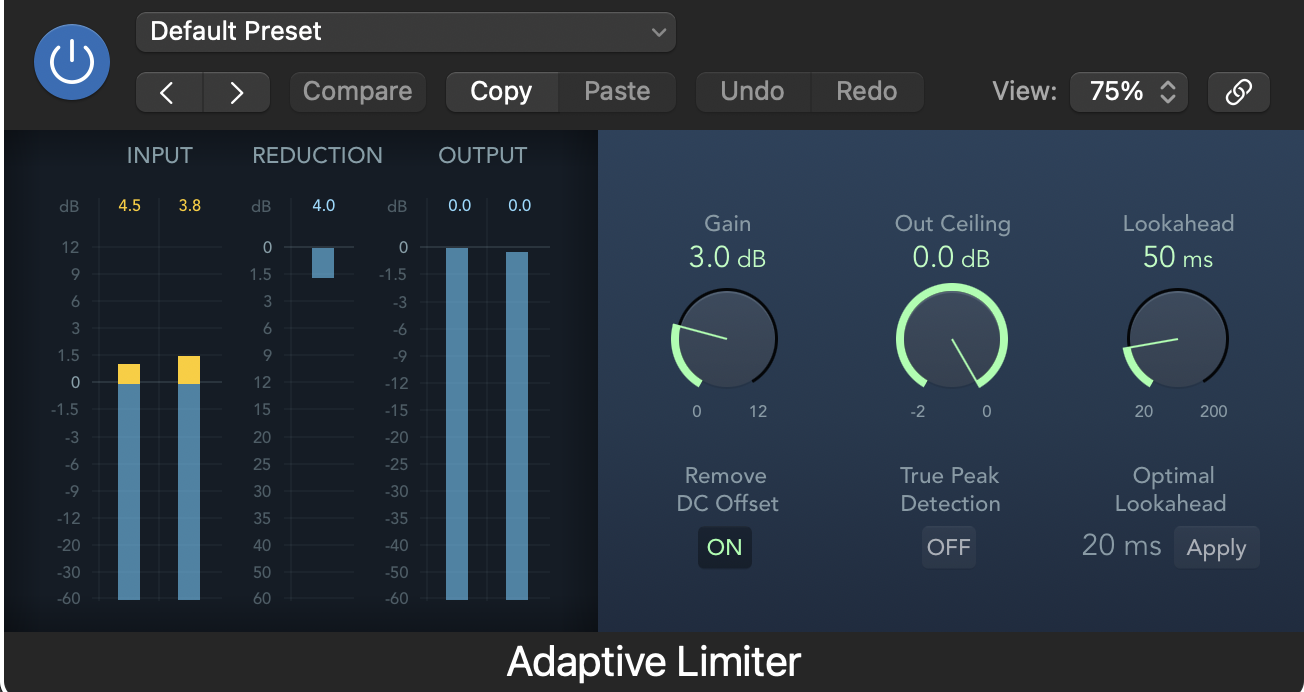
Screenshot of an audio processing software displaying an adaptive limiter interface with various controls, meters, and settings.
Audio frequency spectrum displayed on an equalizer software interface, with various frequency ranges and gain levels shown in a graph format.
Screenshot of an audio spectrum analysis tool displaying a frequency response graph with various controls and settings, including labels for frequency, gain, and processing options.
Screenshot of an audio compressor interface with various controls such as threshold, ratio, attack, release, auto gain, output gain, input gain, and meters indicating audio levels.
Screenshot of a music or audio editing software interface showing a tremolo effect with adjustable parameters, including rate, depth, smoothing, and phase, labeled 'Tremolo'.
Screenshot of a music production software interface displaying an ensemble of sound controls, including multiple oscillators, sliders for stereo spread and phase, and other audio parameters.
Screenshot of an audio editing software interface with a waveform display, various controls, and settings for sound modification such as volume, filters, and effects.
An audio plugin interface labeled "Scanner Vibrato" with controls for Type, Depth, Stereo Phase, Left, and Right parameters, designed to add vibrato and chorus effects to audio.
Audio equalizer interface showing a frequency response curve at 2000 Hz, with a dry signal ON and a harmonic increase of 10.6%, labeled 'Exciter'.
Audio equalizer interface showing gain set to 0.0 dB, phase invert options, balance at 0.0%, and off switches for swap L/R and mono.
Screenshot of a digital audio mixer interface titled 'Direction Mixer' with controls for direction, spread, and input selection, set to mono.
Audio settings interface displaying note value 1/8, feedback at 64%, dry signal at 96%, wet signal at 78%, and color adjustment slider, with the label 'Echo' at the bottom.
Audio editing software interface showing noise gate settings with knobs for threshold, reduction, attack, hold, and release, and sliders for high and low cutoffs.
Audio software interface displaying stereo delay settings with controls for left and right channels, global settings, and output mix levels.
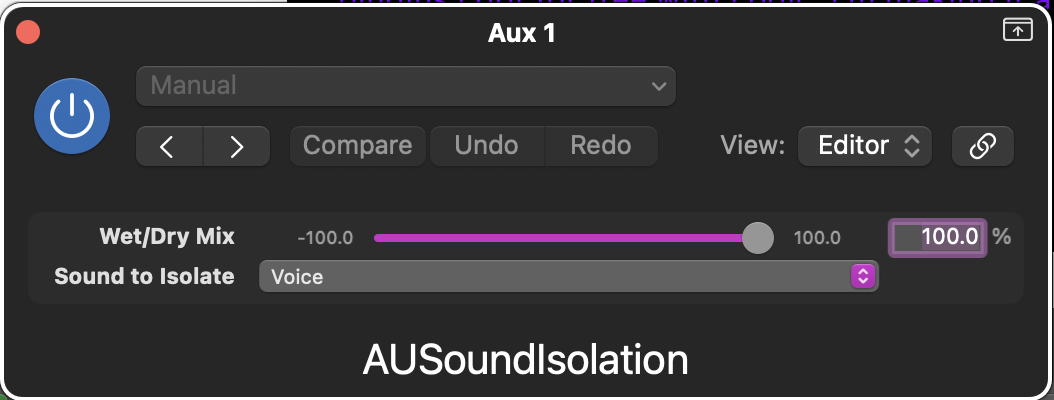
A digital audio interface screen showing controls for Wet/Dry Mix set at 100%, with options for sound to isolate set to voice, labeled AUSoundisolation.
Digital audio mixing software interface displaying frequency, intensity, channel delay, and mix controls, with the label 'Spreader' at the bottom.
Audio editing software user interface showing equalizer and sound reduction settings, named DeEsser 2.
A digital audio plugin interface showing a bandpass filter with a curve centered at approximately 6.1 kHz, with controls labeled 'Aux 1' and 'AUbandpass'.

Audio processing Plugins From Other Developers

Recording studio with a large mixing console, multiple monitors, and speakers, with a view of the recording booth and a grand piano in the background.
Recording studio control room with mixing console, studio monitors, and sound editing software on screen.
Professional recording studio control room with mixing console, studio monitors, audio equipment, a computer monitor displaying audio tracks, and soundproof walls.
A digital audio mixing console with large speakers, smaller monitors, and various controls in a recording studio. The branding includes 'SIENNA' and 'ACUSTICA'.
Screenshot of a software interface titled 'Wider' with a graphic showing a wider setting at 0%. It includes branding from Polyverse and Infected Mushroom.
Digital audio plugin interface called Trackspacer 2.5 by Wavesfactory, with controls for amount, low-cut, high-cut, and a display showing a waveform, on a computer screen.
Audio plugin interface titled 'Clarity Vx' with control knobs and settings for neural network analysis, including 'Broad 1' selection, 'Single' analysis mode, and a large central knob.
Screenshot of an audio synthesizer plugin interface with various controls and settings, including sections labeled Global, Sub, and Edge, with knobs and switches for adjusting sound parameters.
Screenshot of audio editing software displaying a MaxxBass plugin with the bass response curve and controls for input, output, and frequency.
Audio mixing software interface displaying controls for attack, sustain, wet/dry mix, speed, gain, and filter, with the brand name TranspERC and Apisonic Labs logo.
Audio editing software interface with visual sound wave and controls for pitch, clarity, de-ess, compressor, tone, and space.
Screenshot of Neutron 5 Elements audio editing software interface, showing equalizer, spectrogram, and various sound manipulation controls.
Screenshot of an audio editing software interface called Ozone 9 Elements, showing a section with equalizer, imager, and maximizer controls, along with a graphic equalizer, volume faders, and various buttons for audio processing.
Screenshot of Vocal Doubler plugin interface with a circular graphic and controls for separation and variation percentage.
Screenshot of music production software called Waves Tune LT, showing a blank piano roll with no notes, various control buttons, and settings for speed, note transition, and ratio.
Audio plugin interface with controls for breath and energy, including sliders, graphs, and toggle options for voice and breath monitoring.
Screenshot of a digital audio effects plugin interface called Dual Delay X, showing various controls for delay, rotation, feedback shaping, diffusion, tape saturation, and digital grit settings.
Screenshot of a digital audio plugin named 'Crystalline' with controls for reflection, depth, clean-up, shape, and output, featuring sliders, buttons, and graphical displays.
Screenshot of a digital audio mixing interface showing a DeEsser plugin, with controls for threshold, attenuation, and output levels, and options for audio channels.
Digital audio plugin interface with a circular controller labeled "boom!" and a mechanical fader labeled "bypass," both associated with the "bx_boom" plugin from Brainworx.
Digital audio workstation screen displaying guitar effects rack with equalizer, gain booster, guitar amplifier simulation labeled 'Fire Breather,' room reverb, and other audio processing controls, with a sidebar of various preset categories on the left.
A digital image of the Shadow Hills Mastering Compressor audio plugin interface, featuring various knobs and meters for controlling and monitoring audio compression settings.
A digital audio software interface showing equalizer settings with multiple adjustable controls, graphs, and sliders for sound manipulation, labeled as Doubler4.
Digital audio mixer interface with various knobs and controls for sound adjustment.
Audio plugin interface for BRAINWORX bx_digital V3 featuring mono and stereo sections with various controls and equalizers.
Audio plugin interface named bx_cleansweep V2 by Brainworx with filter controls and a frequency spectrum display.
An audio mixing software interface showing two Black Box Analog Design HG-2MS guitar preamp models, with various controls for saturation, pentode, triode, and output, level meters, and technical settings at the bottom. The interface has a dark background with blue accents and labels.
Screenshot of an audio plugin interface named RAUM, with various knobs labeled Feedback, Predelay, Low Cut, High Cut, Reverb, Diffusion, Size, Decay, Modulation, and Damping, featuring blue and purple color schemes.
Screenshot of Brauer Motion software interface with a 3D globe and waveform paths, featuring control panels for sound synthesis and modulation settings.
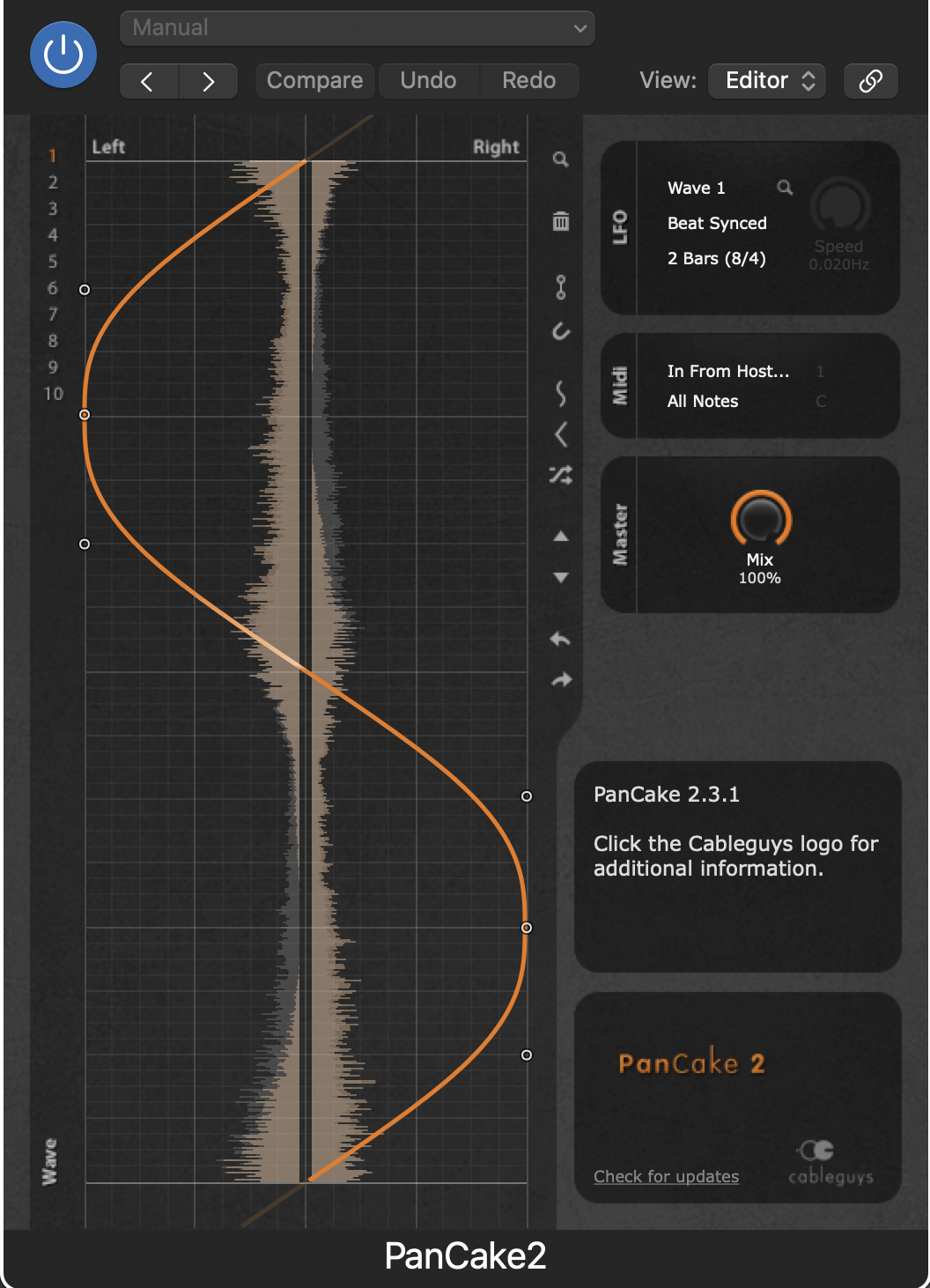
Audio editing software screenshot showing a frequency spectrum with an automation curve, tracks labeled 'Wave 1,' 'Beat Synced,' '2 Bars (8/4),' and options for mastering and mixing.
A digital audio plugin interface called Squash with a dark background, a central purple control knob, and a wet/dry slider at the bottom. The interface displays settings like Tone and Depth at 0%.
A digital audio plugin interface named 'Fire The Pump x64' by Acustica, featuring a pumpkin graphic in the center with a green stem. The interface has controls for size, input, output, and a central knob resembling a pumpkin with a glowing green stem.
Screenshot of a digital audio plugin named KORVPRESSOR with controls for input, output, attack, ratio, release, bass, mid, treble, and toggle switches for lookahead, maximize, makeup, and brickwall.
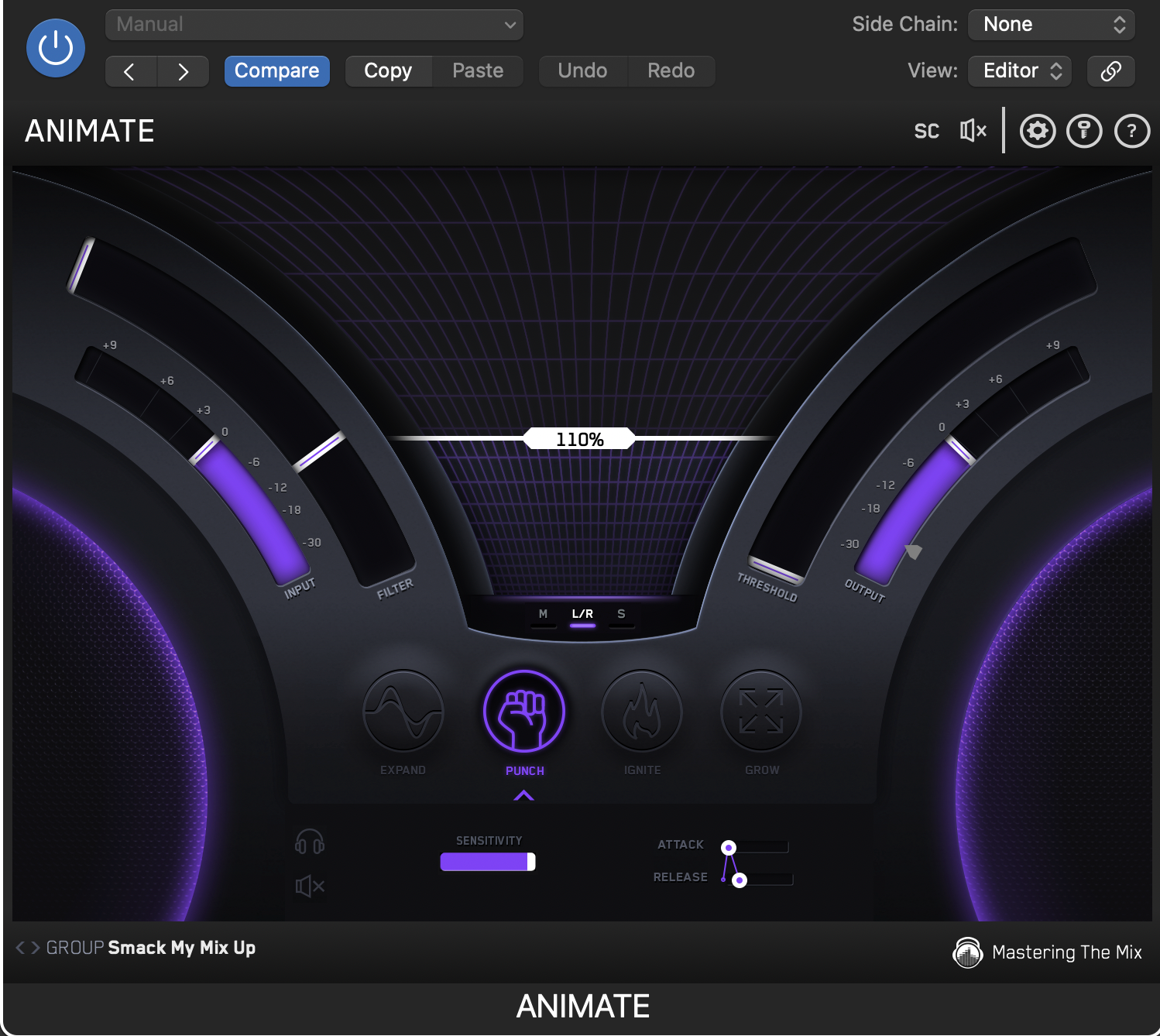
Music production software interface with levels, controls, and a central progress bar showing 110%.
Audio processing software interface with various controls and settings, including frequency, reverb, modulation, and tail width parameters.
A digital audio plugin interface named IDX Intelligent Dynamics, featuring controls for speed, output, input/output meters, and a graph for analyzing audio frequencies.
Screenshot of a digital audio plugin interface with controls for equalization, reverb, and harmonic modes, labeled COBALT and SAPHIRA.
Audio mixing software interface with equalizer and controls, labeled 'Vitamin (s)'.
Audio equalizer interface for Silk Vocal preset with controls for male voice, mid frequency, low and high sliders, and output level
An audio mixer control panel with knobs for adjusting low, high, punch, and master volume levels, sliders for center and sides balance, and a central vertical fader for left and right stereo control.
Digital audio plugin interface for Waves Harmony with controls for key, scale, and pitch settings, including a keyboard display, pitch wheel, and various effect knobs.
Image of an audio mixing interface labeled Vocal Rider, featuring control knobs for Vocal and Music, sliders for Range, Rider, and Output, and buttons for automation modes OFF, WRITE, and READ.
Audio equalizer interface with adjustable frequency bands, sliders, and a colorful graph showing frequency response.
Screenshot of a Q10 equalizer audio editing plugin showing controls for input, band, gain, frequency, Q factor, and output, with customizable bands marked in various colors.
Audio editing software interface showing equalizer, compressor, and noise gate controls.
A digital audio mixer interface labeled 'DYNAMODE' with various controls for frequency bands, width, pan, depth, heat, and wet/dry mix, along with input and output level meters and frequency limit indicators.
Screenshot of Nimbus audio plugin interface with controls for frequency, reverb, delay, and other audio effects, labeled with various settings and parameters.
Audio software interface labeled RX 8 Voice De-noise with sliders and filters for noise reduction.